
Beat Maker Pro - DJ Drum Pad
MWM - AI Music and Creative AppsMusic & Audio
4.69.27K Reviews
- Version
- 4.22.00
- Installs
- 50.00M
- Age Rating
- Everyone
Screenshots
Our Review of Beat Maker Pro - DJ Drum Pad
 Analysis by Appyee
I like music apps that let me try an idea before I have to learn a complicated production setup. Beat Maker Pro - DJ Drum Pad is aimed at that quick, hands-on kind of beatmaking: tap pads, listen to how sounds sit together, and see whether a rhythm starts to take shape. It is a music and audio app from MWM - AI Music and Creative Apps, and its appeal is less about replacing a full studio than making rhythm practice feel approachable.
A low-pressure way to start making rhythms
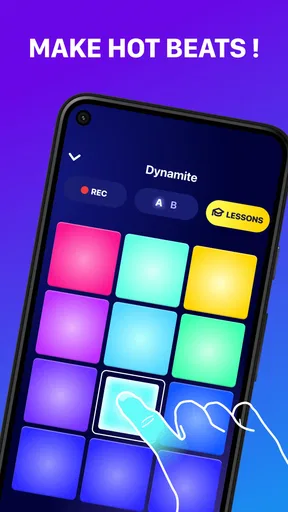
When I open a drum-pad app, I want to be able to make a sound quickly and understand what my taps are doing. This one is built around that immediate interaction, which makes it suitable for a short creative break as well as a first step into beatmaking. A beginner can explore patterns without first learning a traditional music workstation, while someone with more experience can use the pads as a casual sketchbook for rhythmic ideas.
The important distinction is that accessible does not mean effortless. Tapping a few pads is easy; making a rhythm feel deliberate takes attention to timing, repetition, and the relationship between sounds. I would treat the app as a place to experiment and practise, rather than assume that a few taps automatically produce a finished track. That expectation makes the experience more rewarding and keeps its role clear.
Getting Into the Groove
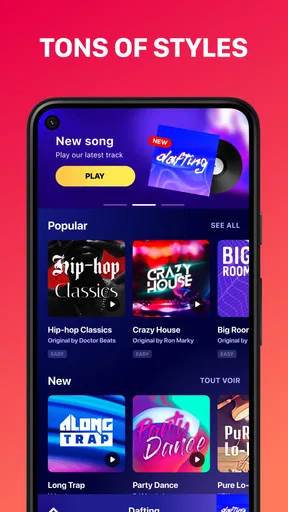
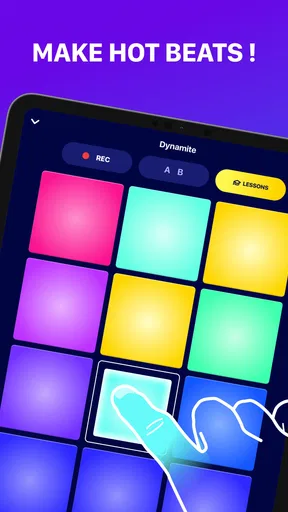
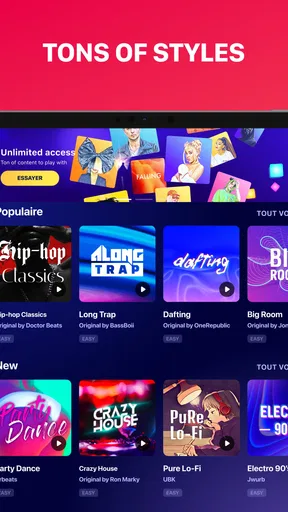
First off, let's talk about how easy it is to dive into Beat Maker Pro - DJ Drum Pad. The interface is straightforward, which is fantastic because no one likes fumbling around when all you want to do is create some sick beats. You'll find an array of colorful pads that are just begging to be tapped. With a variety of sound packs to choose from, ranging from hip-hop to EDM, the app offers a buffet of audio delights.
What the pads are best at
The pad-based layout encourages trying combinations by ear instead of starting with a blank timeline. That is a useful trade-off for a phone: I can test a rhythmic idea in a few moments, but a grid or multitrack view may be better when I need detailed editing and a clear view of every part. If your main goal is to explore groove, the immediate response of tapping pads is the point. If you need precise arrangement work, a more traditional music-production app is likely to suit you better.
A practical way to get more from a short session is to pick one sound pack and stay with it long enough to find a small pattern you like. Changing sounds constantly can be fun, but it can also make it harder to notice whether the rhythm itself works. Once a pattern feels steady, try changing only one element at a time. This simple habit helps separate a strong beat from a combination that sounds exciting only because several things changed at once.
Features That Hit the Right Note
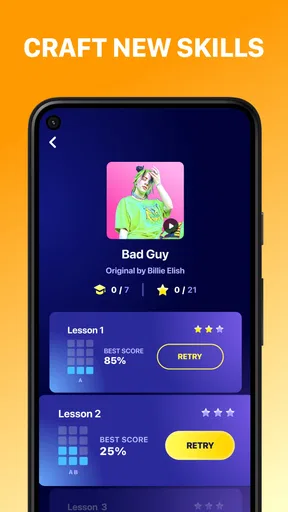
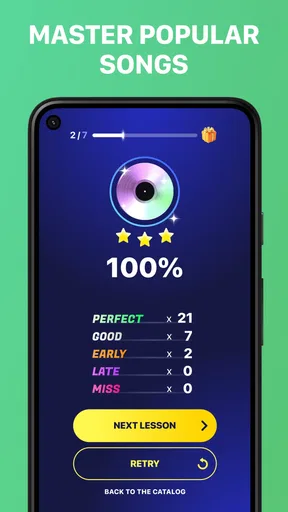
One of the standout features is the extensive library of tutorials. Seriously, it's like having a personal beatmaking mentor in your pocket. These tutorials guide you through the basics and even some advanced techniques, ensuring you can impress your friends in no time. Plus, the app's sound quality is top-notch, making every beat crisp and clear.
I would use the lessons as prompts for active practice rather than watch them passively. Try a technique, pause, and repeat it until the rhythm feels comfortable; then see whether you can adapt it instead of copying it exactly. That approach makes instructional material more useful to a new user and gives an experienced player a reason to revisit familiar basics. It also helps when a technique sounds good in a demonstration but feels awkward under your own fingers.
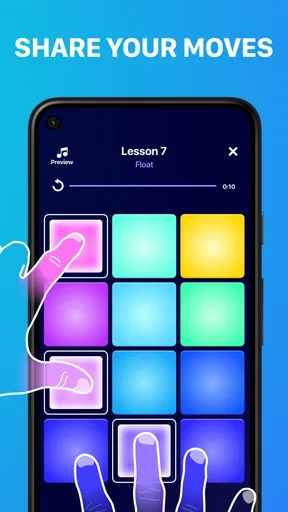
Another feature I love is the ability to record your sessions and share them directly through the app. Whether you're collaborating with friends or just showing off your latest creation, this makes sharing seamless.
Recording, sharing, and sensible expectations
Recording is especially handy when an idea arrives unexpectedly. I would capture a promising take before trying to improve it, because repeated experimentation can easily lead away from the version that first worked. A short recording can also make it easier to compare two attempts: listen back for whether the pulse stays consistent, whether the accents land where you intended, and whether the pattern has a satisfying ending.
Sharing a session is not the same thing as having a complete collaboration or mastering workflow. If you are sending an idea to a friend, it helps to explain what you want them to listen for: the rhythm, the sound choices, or a possible direction for another part. That makes a quick share more useful than simply sending a clip and hoping the listener guesses what you had in mind. For a polished release, I would still move beyond a casual drum-pad session and use tools designed for detailed production.
Jam-Packed with Creativity
Creativity is at the heart of Beat Maker Pro - DJ Drum Pad. The app doesn't just stop at beats; it allows you to layer sounds, adjust tempos, and create loops. It's like having a mini studio in your hands. The freedom to experiment and explore is endless, and before you know it, you'll be crafting your own unique soundscapes.
Those options are most useful when I give each experiment a purpose. For example, I might keep the tempo steady while trying different layers, then change the tempo only after deciding which sounds belong together. That makes cause and effect easier to hear. Loops can also be a good way to practise consistency: rather than constantly adding new sounds, let a compact idea repeat and check whether it still holds your attention after several cycles.
There is a natural limit to this kind of mobile workflow. Pads encourage performance and quick variation, while long-form arrangement asks for more editing, organisation, and control. I would not choose a drum-pad app as my only tool if I needed to build a complex song from several carefully arranged sections. For quick sketches, rhythmic play, and practice, though, the focused format can be an advantage rather than a drawback.
Making it fit an ordinary day
A realistic use is a short break between tasks: put on headphones, open a lesson or sound pack, and spend a few minutes testing a rhythm without setting up instruments. On a commute, I would keep the session simple and avoid expecting a noisy environment to be ideal for judging subtle sound differences. At home, a longer session gives more room to repeat a pattern, record a take, and decide whether it is worth sharing.
It can also help someone who wants to understand beatmaking before investing time in a more demanding production setup. The app offers a tactile introduction to rhythm and layers, but it should not be mistaken for a shortcut to every part of music production. If your interest is mainly composing melodies, recording vocals, or editing a detailed arrangement, look for a tool built around those jobs. If you want to practise tapping patterns and explore drum sounds, this narrower focus makes sense.
For a first-time user, I would start by tapping a steady pulse rather than trying to fill every moment with sound. Add an accent or a second layer only after the basic pattern feels reliable. This gives your ears something stable to compare against and makes mistakes easier to spot. It is a small practice choice, but it can turn aimless tapping into a useful exercise.
Who should try it, and who may prefer another tool
I would recommend giving it a try if you enjoy rhythm, want a friendly entry point into beatmaking, or like the idea of building a quick loop with your fingertips. It can suit a casual music fan who wants to play, a beginner looking for guided practice, or a more experienced creator who wants a lightweight place to test a groove before opening a larger project.
I would be more cautious if you need dependable fine-grained editing, a broad instrument palette, or a complete production workflow in one place. A conventional digital audio workstation is usually the better choice for arranging a full composition and controlling many tracks. A physical pad controller may also feel more comfortable to someone who makes beats for long sessions and values dedicated hardware. The app's strongest case is immediacy, not replacing every alternative.
It is free to download, with optional in-app purchases ranging from under a dollar to just under ninety dollars per item. I would explore the basic experience first and decide whether the additional options matter to my own routine before spending anything. The app is rated for Everyone, has an average rating of 4.6 from around 502,000 ratings, and has been installed over 50 million times. Those figures suggest broad interest, but they do not tell me whether its particular workflow will suit you; trying the pads yourself is still the best test.
Trust, choices, and what I would check
Music-making apps can bring up practical questions beyond sound: what a user chooses to share, whether an account is needed for a particular task, and what permissions appear during use. I do not treat a creative feature as proof of a particular data practice. Instead, I look at the choices presented on the device and read the current privacy and permission explanations before deciding what to enable. That is a sensible habit with any app that records or shares creative work.
For a session that is only for practice, I would keep the goal simple and avoid sharing a take until I had listened back and chosen it deliberately. If I planned to send a recording, I would make sure I was comfortable with the destination and with the content of that recording. These steps do not require assuming anything about how the app handles information; they are ordinary ways to stay in control of my own creative material.
The app is free, but in-app purchases mean it is worth paying attention to the purchase screen and the options shown before confirming anything. I would also check the current app permissions and account prompts on my own device rather than assume every installation presents the same choices. My preference is to grant only what is needed for the task I am actually doing and to make sharing decisions intentionally.
Wrapping Up the Experience
So, is Beat Maker Pro - DJ Drum Pad worth the download? Absolutely! It's user-friendly, packed with features, and offers a solid platform for anyone looking to dive into the world of music production. Whether you're killing time on your commute or sitting at home feeling creative, this app fits the bill perfectly.
My recommendation comes with a clear boundary: use it for approachable beat practice, quick ideas, and playful experimentation, not as a guaranteed substitute for a full music workstation. Its tutorial-led, pad-focused approach can make starting less intimidating, while the option to record gives a promising session somewhere to go next. If you want detailed control over an entire production, compare it with more complete tools before settling in.
The app was released in 2018, and its current version is 4.13.00; it supports devices running Android 7.0 or later. I would still check compatibility on the device I plan to use, especially if it is older, before building a regular routine around it. For someone who simply wants to tap out ideas and learn by trying, the low-friction format is the main reason I would recommend giving it a go.
With its vibrant community and constant updates, you're never short of new content and challenges. So go ahead, hit those pads, and let your inner DJ shine!
Privacy and Permissions
See what permissions an app requests and how it handles your data.
- Photos/Media/Files
- read the contents of your USB storage, modify or delete the contents of your USB storage
- Storage
- read the contents of your USB storage, modify or delete the contents of your USB storage
- Wi-Fi connection information
- view Wi-Fi connections
- Other
- view network connections, full network access, control vibration, prevent device from sleeping, Google Play license check
Verdict
Strengths of Beat Maker Pro - DJ Drum Pad
- Intuitive interface for easy beat creation.
- Wide variety of sound packs available.
- Real-time audio effects enhance creativity.
- User-friendly tutorials for beginners.
- Customizable drum pads for personalization.
Limitations of Beat Maker Pro - DJ Drum Pad
- Limited features in free version.
- In-app ads can be intrusive.
- Requires internet for some features.
- Advanced features need premium access.
- Learning curve for advanced functions.
Other Releases by MWM - AI Music and Creative Apps
View All
edjing Mix - Music DJ app
Music & Audio4.6

Piano - music & songs games
Music & Audio4.7

Guitar Tuner Pro: Music Tuning
Music & Audio4.3

Stemz: AI Tool for Musicians
Music & Audio4.4
Similar Picks in This Category
View All
YouTube Music
Google LLC4.4

Samsung Music
Samsung Electronics Co., Ltd.3.8

Spotify: Music and Podcasts
Spotify AB4.3

JioSaavn - Music & Podcasts
Saavn Media Limited4.3

Lark Player:Music Player & MP3
Lark Player Studio - Music, MP3 & Video Player4.6

StarMaker: Sing Karaoke Songs
SKYWORK AI PTE. LTD.4.3
Frequently Asked Questions
What are the main features of Beat Maker Pro - DJ Drum Pad?
Beat Maker Pro offers a comprehensive set of tools for creating music, including a wide array of drum pads, loops, and sound effects. Users can access various genres, from hip-hop to EDM, and create tracks with professional-quality sound. The app also includes tutorials for beginners, making it accessible to users of all skill levels.
Is Beat Maker Pro suitable for beginners?
Yes, Beat Maker Pro is designed to be user-friendly for beginners. It includes step-by-step tutorials and a simple interface that helps new users learn the basics of beat making. The app provides guided sessions and tips to help users quickly get up to speed with creating their own music tracks.
Does Beat Maker Pro require an internet connection to use?
While you can use Beat Maker Pro offline for creating music, some features, such as downloading new sound packs or accessing tutorials, may require an internet connection. This ensures you can have the latest updates and expand your creative options with new content.
Can I export my tracks to share with others?
Yes, Beat Maker Pro allows users to export their tracks in various formats, making it easy to share your creations with friends, upload them to social media, or even incorporate them into professional projects. The export feature ensures your music maintains high quality, suitable for any platform.
What are the purchase options for Beat Maker Pro?
Beat Maker Pro is available as a free download with basic features. However, for access to premium content and advanced features, users can opt for in-app purchases or subscribe to a premium plan. This subscription includes exclusive sound packs, effects, and more, enhancing the overall music creation experience.
